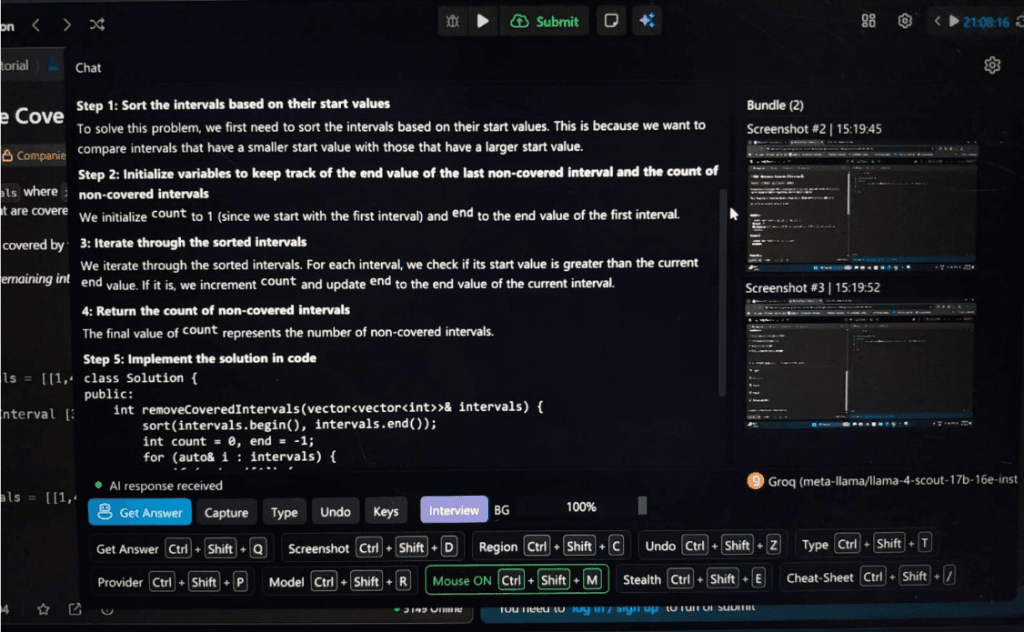
Practice Smarter.
AI coding tutor for mock interviews and DSA
HintLens is a Windows AI tutor that sits beside your practice problem. Capture a question, get step-by-step hints, and type the solution at a natural pace. Built for personal interview prep, DSA drills, and mock sessions.

Meet
HintLens
How to use HintLens ?
Trusted by professionals who secure roles at leading companies


Prepare for every stage of the interview loop. From DSA warm-ups to full mock interviews, practice the skills that compound.

CODING
PRACTICE
AI TUTOR FOR DSA
Coding Practice
Practice DSA, algorithms, and system design with step-by-step hints beside your LeetCode or HackerRank practice problem.
MOCK INTERVIEW
PRACTICE
SELF-PACED PREP
Mock Interviews
Rehearse technical and behavioral questions with structured answer frameworks and feedback on your reasoning.
A desktop tutor for your interview prep. Zero footprint.
Runs beside your practice IDE and feeds you step-by-step hints as you work.
Lightweight Overlay
A minimal always-on-top window that sits beside your practice problem. Toggle its opacity down for deep work or up when you need a hint.
Multi-Model Intelligence
Powered by Groq, OpenAI, Claude, and Gemini. Get instant, accurate answers from the world's smartest AI engines simultaneously.
Typing Drill
After you understand a pattern, let HintLens type the reference solution into your practice IDE at a realistic WPM so you can follow along and rebuild muscle memory.
Multilingual Support
Practice in 30+ languages. Explanations, hints, and example solutions render in your preferred language so you can study comfortably.
Cloud History & PDF
Every practice session is backed up automatically. Export problem walkthroughs and notes to PDF so you can review them later.
Tailored System Prompts
Tell the tutor how to coach you. Define your own system prompts so hints match the role you are preparing for.
A patient tutor. A powerful stack. HintLens combines world-class AI models with a minimal desktop overlay, giving you a quiet place to think, learn, and practice.
Multilingual
90msresponse30+languages
Advanced AI Models
Always on the latest models with real-time WebSearch built directly in.
Typing Drill
Build muscle memory for common DSA patterns. The simulator types a reference solution at your preferred WPM so you can follow along in your IDE.
Cloud History & PDF Export
Every practice session is backed up to the cloud. Export problem walkthroughs and system-design sketches to PDF with one click.
Custom Prompts
Define exactly how the AI behaves. Tell it to answer like a Senior Architect or Frontend Specialist to match your role perfectly.
Instant Hotkeys
Show or hide the overlay instantly with customizable global shortcuts. No mouse required when you are deep in a problem.
Native App & Lightweight< 2 MB
Built in C++ and heavily optimized for Windows. HintLens runs natively without draining your battery or causing any lag, so a four-hour study marathon stays smooth from the first problem to the last.
TESTIMONIALS
What our users say. Real prep stories from engineers who landed the role they were studying for.
I spent two weeks prepping with HintLens before my PM loop at a FAANG. Walking through case frameworks with step-by-step hints gave me the mental model I needed. Walked into the real interview confident and offer in hand.
Technical Product Manager @ Datadog
Used HintLens for a month of prep before switching roles. The structured hints on growth frameworks helped me build cleaner answers for behavioral prompts without them sounding scripted. Loved the offline review mode.
Growth Marketing Manager @ Notion
Rebuilt my DSA foundations with HintLens over 6 weeks before my Dropbox loop. Rate-limiting, LRU caches, consistent hashing, I drilled each pattern until I could type it from scratch. The typing simulator was clutch for muscle memory.
Backend Developer @ Dropbox
Fintech backend roles have very specific security and compliance questions. HintLens helped me drill PCI-DSS basics, secure session design, and threat modeling until the answers were second nature.
Software Engineer @ Fidelity Investments
I grinded LeetCode mediums every evening with HintLens open on my second monitor. It nudged me toward the right pattern when I got stuck instead of showing the full answer. My DSA pattern recognition got way sharper.
Frontend Engineer @ Vercel
Infrastructure interviews are a breadth test. HintLens let me drill through a weekend of practice questions on Linux internals, Kubernetes failure modes, and TCP tuning. Review mode saved my notes for the next go-around.
DevOps Engineer @ Cloudflare
QA interviews throw a ton of framework questions. HintLens helped me quickly review Cypress patterns, Playwright trade-offs, and flaky-test strategies during my prep nights. Walking in prepared is a totally different feeling.
QA Automation Engineer @ Browserstack
What sold me was how patient the tutor is. I asked the same AWS architecture question four different ways while studying and got a progressively deeper explanation each time. That is how you actually internalize a design pattern.
Cloud Architect @ SAP Labs
Out of the interview game for 4 years. HintLens helped me re-learn market-sizing frameworks at my own pace. The typing drill for my STAR answers was an unexpected win, muscle memory for structured responses.
Financial Analyst @ Stripe
Preparing for ML system design case studies is exhausting. HintLens walked me through recommender edge cases, cold-start problems, and A/B test design. I built a mental library before I sat in a single real interview.
Data Scientist @ Snowflake
Did 20+ system design practice rounds with HintLens coaching me on trade-offs. By the time I sat in the real interview, I was pattern-matching the prompts in seconds. Can't overstate how much the practice loop helped.
Full Stack Engineer @ Expedia
SQL rounds used to terrify me. I spent two weeks drilling window functions, CTEs, and complex JOINs with HintLens hints. The confidence I had walking into the real interview was night and day.
Data Analyst @ LatentView Analytics
INTEGRATIONS
Your AI practice tutor works alongside the practice sites and meeting tools you already use:
Not all AI tools are the same.
See how HintLens stacks up against generic AI assistants and other overlay apps. We built HintLens specifically for focused interview prep and DSA practice.
Frequently asked questions
Getting Started
First-time setup and platform overview
OVERVIEW
FIRST STEPS
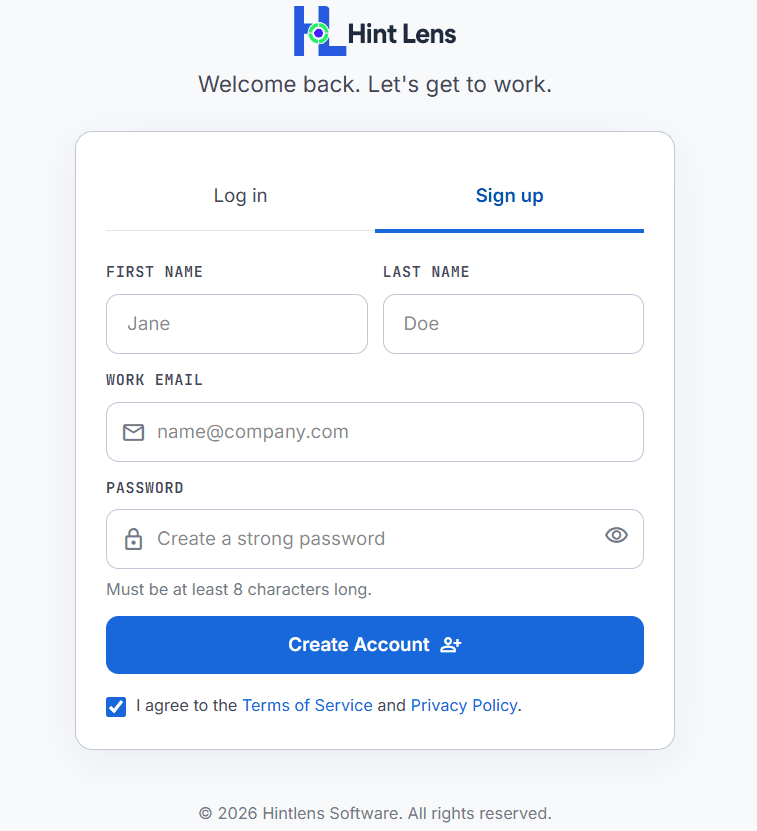
1. Sign up or log in at www.hintlens.com
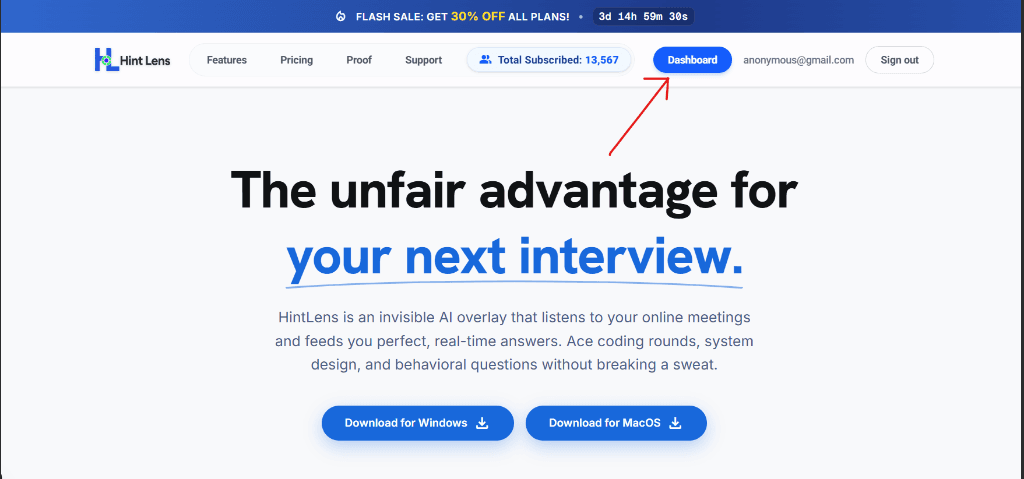
2. Go to your dashboard
There you will find all your tools and settings in one place.
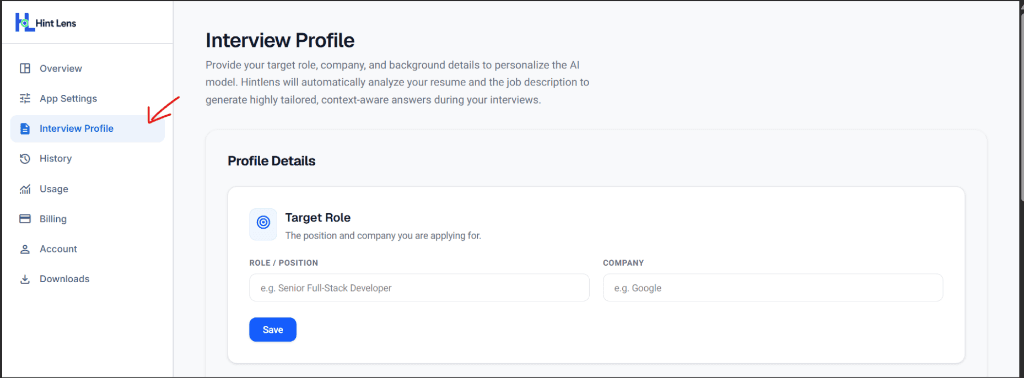
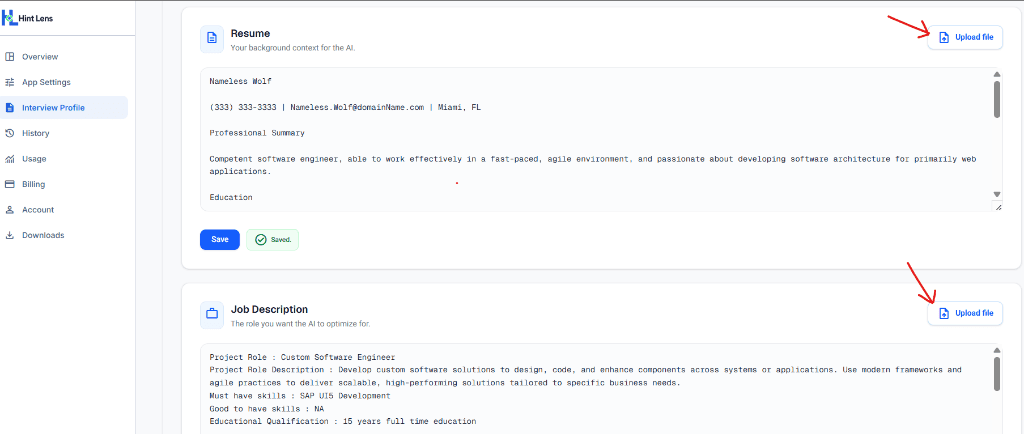
3. Go to interview profile section there you will find the company name, Upload resume and the upload Job description either in pdf or in text.
4. Now go to the download tab and download this for windows
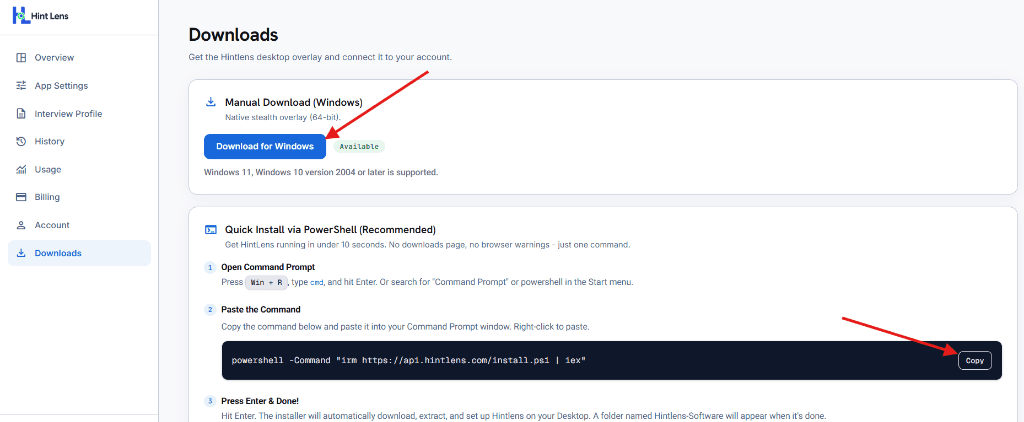
5. Once its download Open it
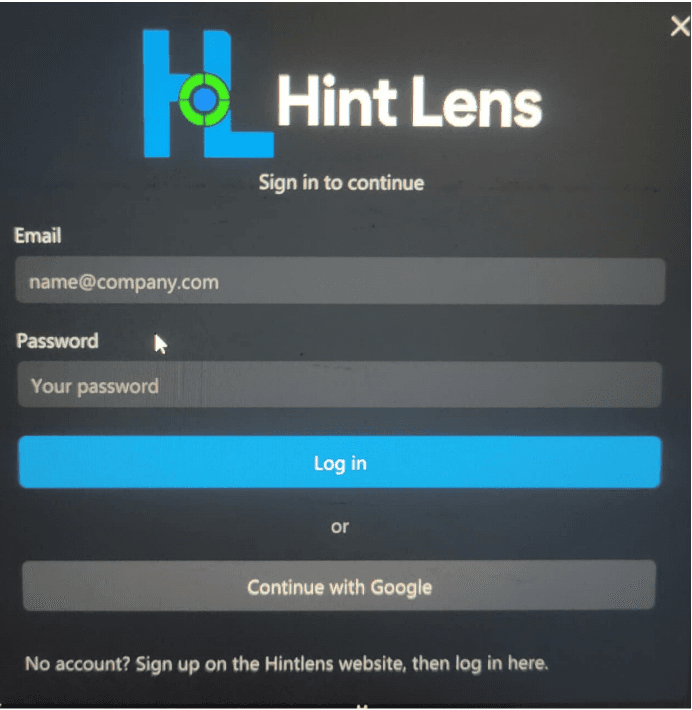
6. The Overlay window appears login with the same account that you do on the HintLens website
7. Then the overlay window appears press Ctrl + Shift + M for enabling mouse and then click on the Interview section
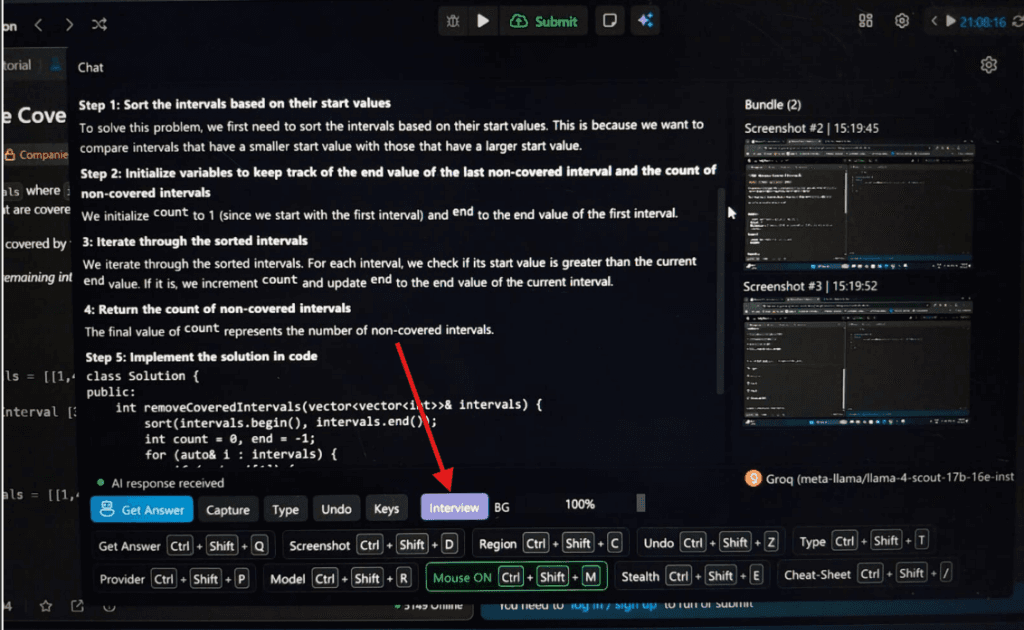
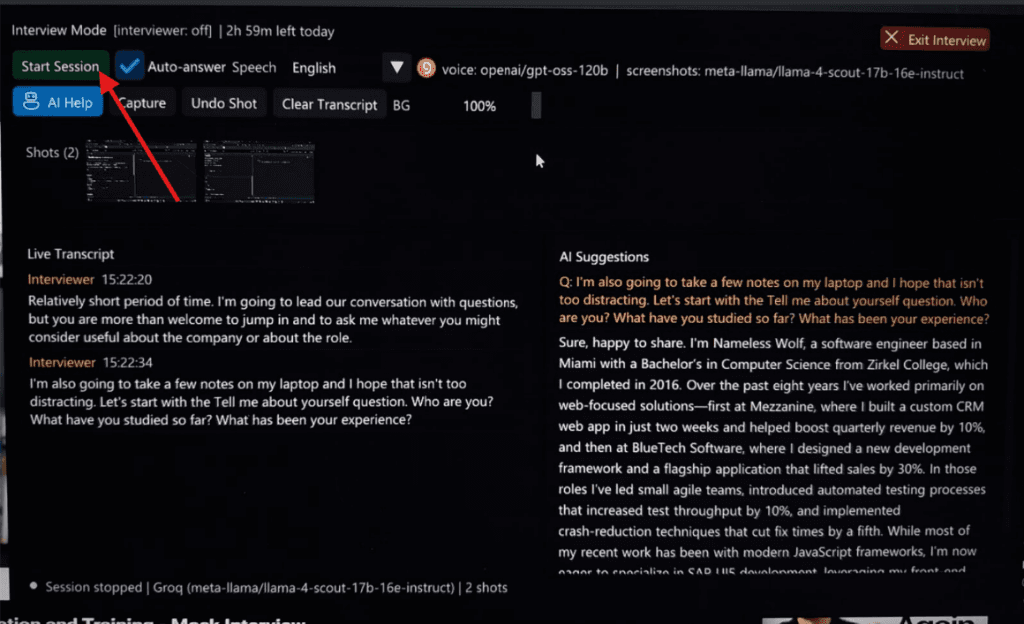
8. Enter the Practice section, start a session, and work through questions with step-by-step hints
Our tutor walks you through DSA patterns, behavioral frameworks, and system-design trade-offs so you can build confidence before your real interview.
1. Sign up or log in at www.hintlens.com
2. Go to your dashboard
There you will find all your tools and settings in one place.
3. Go to interview profile section there you will find the company name, Upload resume and the upload Job description either in pdf or in text.
4. Now go to the download tab and download this for windows
5. Once its download Open it
6. The Overlay window appears login with the same account that you do on the HintLens website
7. Then the overlay window appears press Ctrl + Shift + M for enabling mouse and then click on the Interview section